Skip to content
Used by 1,800+ people weekly

Export AI Conversations Beautifully.

Save any ChatGPT, Gemini, or AI Studio chat as formatted PDF, Markdown, or JSON. Download locally — your conversations stay private, no cloud, no accounts.

Local only · Conversations never leave your browser · No account required

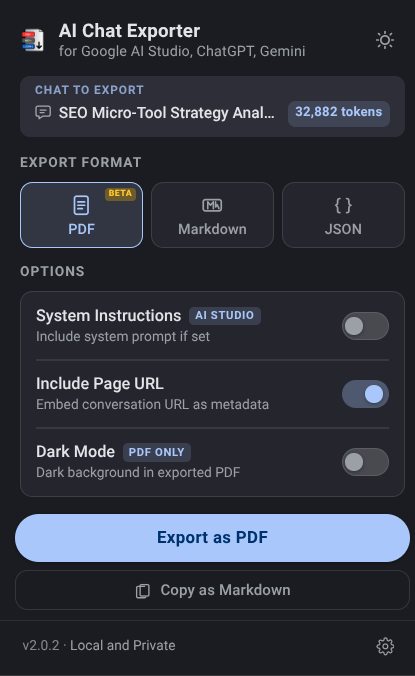
AI Chat Exporter extension popup showing PDF, Markdown, and JSON export options with dark mode toggle and progress bar

Everything you need to keep your AI work.

AI Chat Exporter is a free Chrome extension that exports ChatGPT, Gemini, and Google AI Studio conversations to PDF, Markdown, and JSON files. All processing happens locally in the browser — no data is sent to any server.

Three Export Formats

Export to PDF, Markdown, or JSON. Choose your format with one click — each optimized for its use case.

Copy as Markdown

Skip the file entirely. One click copies the full conversation as Markdown — paste straight into Notion, Obsidian, or GitHub.

Auto-Title Filenames

Files are named from your first message. No more "untitled-export-37.pdf" — get meaningful names automatically.

Dark Mode PDF

Export PDFs with a dark background and light text that matches your chat's aesthetic. Code blocks, headers, all tuned.

Private by Design

No server, no API calls, no account. Your conversations stay on your device. An anonymous uninstall survey (via Chrome's API) is optional — no data is sent otherwise.

Full Conversation Capture

ChatGPT, Gemini and AI Studio use virtual rendering. The extension performs an intelligent multi-pass scroll to capture every turn — even in 100+ message chats.

Open. Click. Export.

1

Open Chat

Navigate to any conversation in ChatGPT, Gemini, or Google AI Studio.

2

Click the Extension

Click the AI Chat Exporter icon in your Chrome toolbar. Pick your format and options.

3

Export

Hit Export Now or Copy. Your file downloads instantly — or it's in your clipboard. Runs in under 3 seconds for most chats.

Pick the format that fits your workflow.

📄 PDF

Beautiful, shareable, ready to send.

ChatGPT / Gemini

Here's a Python function that handles pagination efficiently:

def paginate(items, page=1, size=20):
start = (page - 1) * size
return items[start:start+size]

Supports dark mode, code blocks, tables, inline formatting, and system instructions.

📝 Markdown

Perfect for pasting into Obsidian, Notion, or any Markdown editor.

### User

How do I handle API rate limits?

---

### ChatGPT / Gemini

Implement exponential backoff with

jitter. Here's a pattern...

Paste directly into any markdown editor. Works with Copy as Markdown for instant clipboard access.

{ } JSON

Use exported JSON to feed into Python scripts, analysis tools, or AI pipelines.

{

"role": "model",

"content": "Use retry...",

"model": "gemini-2.5-pro",

"systemInstruction": "..."

}

Pipe into scripts, LLM pipelines, or databases. Structured and machine-readable.

Frequently Asked Questions

No. Everything runs locally in your browser. Your conversations are never uploaded or sent anywhere. An optional anonymous uninstall survey (via Chrome's uninstall API) opens only if you choose to fill it out — no data is collected automatically.
PDF, Markdown, and JSON. PDF is best for sharing, Markdown for notes apps like Obsidian/Notion, JSON for backups and scripts.
Yes. It works on chatgpt.com, chat.openai.com, gemini.google.com, and aistudio.google.com.
Yes, 100% free with no limits, no account, and no paywall.
Yes. The extension auto-scrolls and captures the full history, even for 100+ message chats.
Yes, use 'Copy as Markdown' and paste directly. Formatting, code blocks, and tables are preserved.
Open any chat, click the extension, choose PDF/Markdown/JSON, then click Export Now.
Yes, it works with all current models on ChatGPT, Gemini, and AI Studio, including reasoning/thinking modes.
Yes, both ChatGPT reasoning and Gemini thinking traces are captured if visible in the UI.
PDF is a formatted document for sharing/printing. Markdown is plain text with formatting for editing in notes apps.